
Run Better Weekly Roster Meetings with a Player-Board Workflow
By RAVEN · DSA Labs
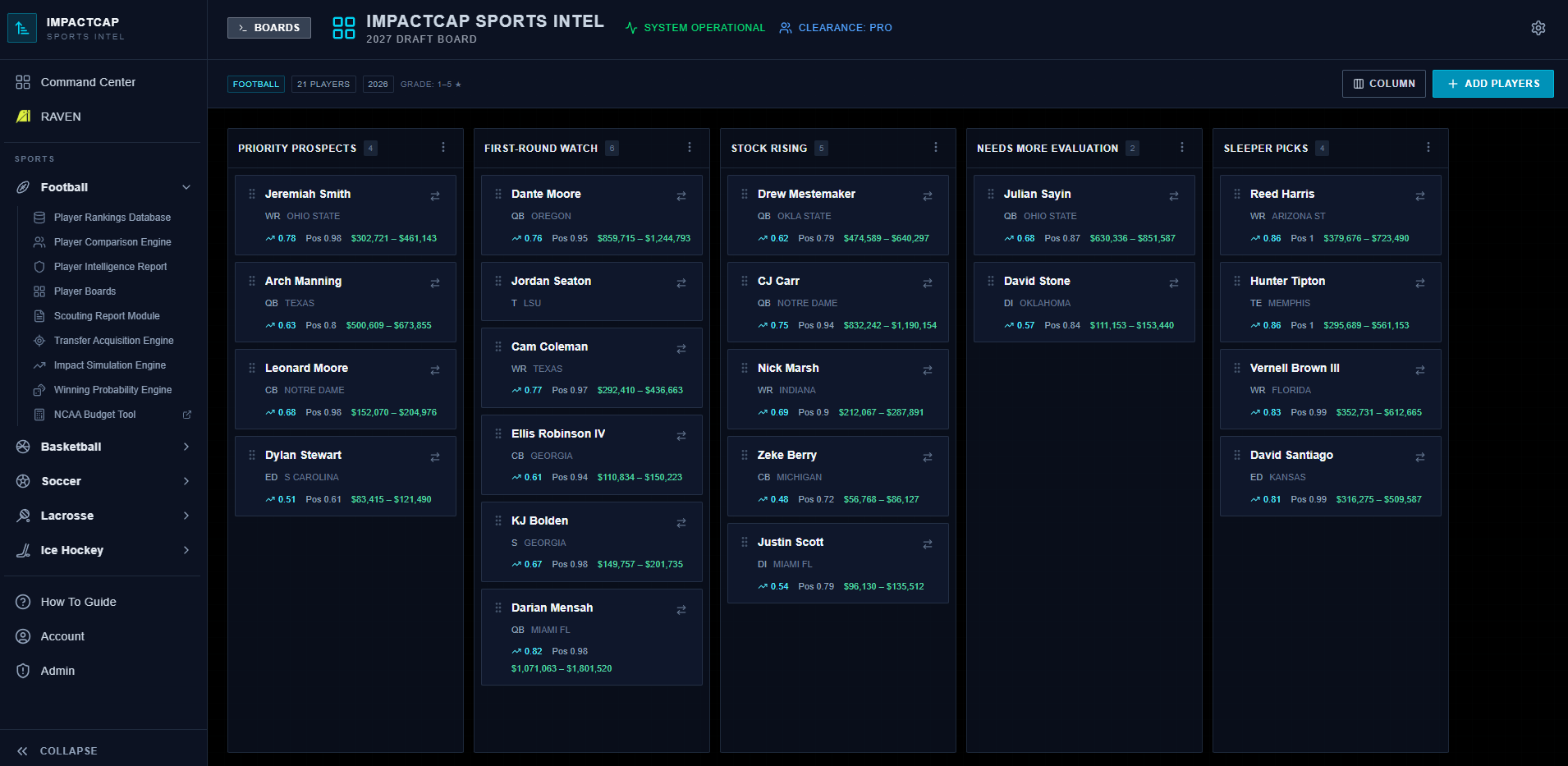
One player board — a centralized shortlist with consistent valuation and staff notes — is the simplest thing a staff can do to shorten meeting prep and sharpen roster decisions.
Every program runs some version of the weekly roster meeting. A coordinator emails a list. A scout drops names in a chat. Someone pulls up a spreadsheet. Someone else opens a different spreadsheet. The head coach walks in with a third list. The meeting starts. The first fifteen minutes are arbitration.
The problem isn't that staffs lack information. It's that the information isn't organized around a single artifact that everyone in the room has already seen. When the board doesn't exist before the meeting, the meeting becomes the board — and that's the most expensive possible way to build one.
The board is the meeting's organizing artifact.
At DSA, we just launched v1 of Player Boards inside ImpactCap. The concept is straightforward: a persistent shortlist for a single sport, league, and season. You start from a template — Recruiting, Watch List, or Custom — rename or reorder the columns to fit how your staff works, and add players straight from the rankings tables.
Every card carries the DSA Impact Ranking, the positional ranking, and (for college leagues) the FMV range, saved from the moment the player was added. On top of that, staff add their own layer: a grade (stars or 1–10), a priority (high, medium, low), tags, and free-text notes. Sort the board, or filter it by position and priority, and it's ready for the screen.
The goal isn't to automate the decision. It's to make sure the decision-relevant information is visible and consistent before the meeting starts — so the meeting itself is spent deciding, not assembling.
The board doesn't replace judgment. It gives judgment something concrete to work with.
One thing we heard consistently as we built toward this: coaches and scouts wanted to be able to add a player to a board directly from a rankings page or a search result, without context-switching to a different workflow. That feedback shaped how we built the add-to-board interaction, and it's part of what makes the board sticky as a daily habit rather than a one-time export.
A four-step prep template that actually runs.
Here's how a well-structured board-first meeting prep works in practice.
Step 1: Populate the board by Thursday afternoon.
Any player under active consideration gets added before Thursday at 4 p.m. No exceptions. Late additions are tabled to next week unless there's a live deadline. This one constraint forces prioritization before the room fills up.
Adding a player from the rankings brings the DSA valuation with them automatically. The rest of the entry is the staff's job, kept in notes and tags:
- Projected role (starter, rotation, depth)
- Eligibility and availability status
- Transfer portal window or commitment timeline, if applicable
- A link to the clip the staff should watch, if you have one
Step 2: Agree on who owns each entry.
Today a board belongs to the person who builds it — usually a recruiting coordinator or director of player personnel, who maintains it and puts it on the screen. That keeps one source of truth. Separately, the staff should agree who is responsible for each player's information: one person, not the position coach and the coordinator. A simple convention is to tag each card with the owner's initials. If an entry is incomplete, it doesn't make the Friday agenda. Clear ownership eliminates orphaned entries that waste meeting time.
Step 3: Run the meeting against the board, not alongside it.
The board is on the screen before anyone sits down. The agenda is the board. You move top to bottom. For each entry: the owner gives a thirty-second frame, the room responds, and you move the player to Advance, Hold, or Passed. Name your columns that way and the board reflects the decision the moment it's made.
Set a staff rule for what earns a move to Advance — for example, nobody advances without a confirmed availability note. The board won't enforce that for you; the room has to. But when the valuation is already on the card, the debate shifts from "is this player good?" to "is this player the right fit at this price and this role?" — which is the only debate that matters.
Step 4: Write the decision and the next action into the notes before leaving the entry.
Advance means a named next step (extend offer, schedule call, request tape from agent), written in the notes with a deadline and the person handling it. Hold means a specific condition that would change the status. Passed means the player moves to the Passed column — not removed. Removing a card deletes it permanently, and you lose the record that the player was ever evaluated.
The board is not a parking lot. Entries without a decision and a next action become noise.
What belongs on every board entry.
Some of it is on the card already. The rest is a staff habit.
- Impact ranking — on the card. The canonical DSA valuation from ImpactCap, not a subjective grade.
- Positional ranking and FMV range — on the card (FMV for college leagues). Use it to judge fit against what your program can spend.
- Staff grade and priority — set on the card, and kept visually separate from the DSA numbers.
- Role projection — starter / rotation / developmental, in a tag or the notes, decided before the meeting.
- Availability — portal status, eligibility year, known interest from other programs, in the notes.
- Video — optional; if your staff relies on a clip, paste the link into the notes.
If an entry is missing what your staff agreed on by Thursday afternoon, it doesn't make Friday's agenda. That's not a punishment — it's a forcing function that makes Thursday's prep more deliberate.
The workflow compounds.
A board that gets used once is a spreadsheet. A board that gets used every week becomes institutional memory — as long as passed players go to a Passed column instead of being removed. Each card keeps the valuation from when the player was added, and the notes keep what was decided. When a player you passed on in October reappears in January, you're not starting from scratch.
We're also moving a cluster of StatLink features into field testing that will deepen how boards connect to team-level workflow and depth-chart planning. The board is the right place to anchor those connections — because the board is already where decisions happen.
The Big Takeaway
The meeting is not where the board gets built. The meeting is where the board gets used.
Populate it Thursday. Agree on owners. Run top to bottom. Write every decision into the notes before you leave the entry, and move passed players to Passed rather than removing them. That structure keeps roster conversations short, honest, and actionable — which is what the season demands.
Player Boards are live now in ImpactCap.
If your staff is running weekly roster meetings without a single board, that's the first thing to fix.